


You probably talked to a voice user interface today and didn't think twice about it. Maybe you asked your phone for directions, told a speaker to play something, or shouted "representative" at an automated phone menu. That's voice user interface design at work, for better or worse. Voice is now normal, not a trick. The difference between a nice call and an awful one can be massive.
A voice user interface or VUI, lets someone use a product by talking instead of tapping, typing, or clicking. The design shift is clear. What once felt new now feels required. A lot of folks talk to their phones and their car systems. They also speak to smart speakers at home. These tools help with everyday things. Then when someone reaches out to a company, they expect support that feels just as simple. If the voice system misses the mark, talks on and on, or cannot get the issue solved, people lose faith fast. This guide explains what a Voice UI is and how it works. It also lays out the key ideas for making a solid voice input UI. You will see which devices use it, and you will learn practical habits for voice UI that hold up in real back-and-forth conversations. It also looks at how voice assistant interfaces are changing customer service.
A voice user interface, or VUI, is any system you operate by talking. You say something, it works out what you meant, and it replies with speech, a sound, or something on a screen. Siri is one. Alexa is one. The robotic voice that answers when you call your bank is one too, though usually not a very good one. You'll also see it called a voice UI or a voice input UI. Same thing, different label.
If you want to notice what makes a VUI feel odd, compare it with a standard screen-based interface. On a website you can look around. Buttons are there, menus are there, and you can usually figure out what's possible without anyone telling you. With voice there's nothing to look at. The user has to know what to say, or guess and hope. That changes the work more than people expect. A screen designer arranges things in space. A voice designer arranges things in time. Everything arrives one piece after another, and nobody can scroll back to catch the sentence they missed. If the system rambles, people forget how it began. If there is a two second pause, they start to ask themselves if the system even picked up what they said.
Building a voice input UI interface does not feel like arranging things on a screen. It feels closer to writing lines for a person to speak. You notice where people hesitate. You listen to how they choose words when they talk. You also have to think about what comes next when the system does not catch the meaning. In those few seconds, the small stuff counts more than how the page looks.
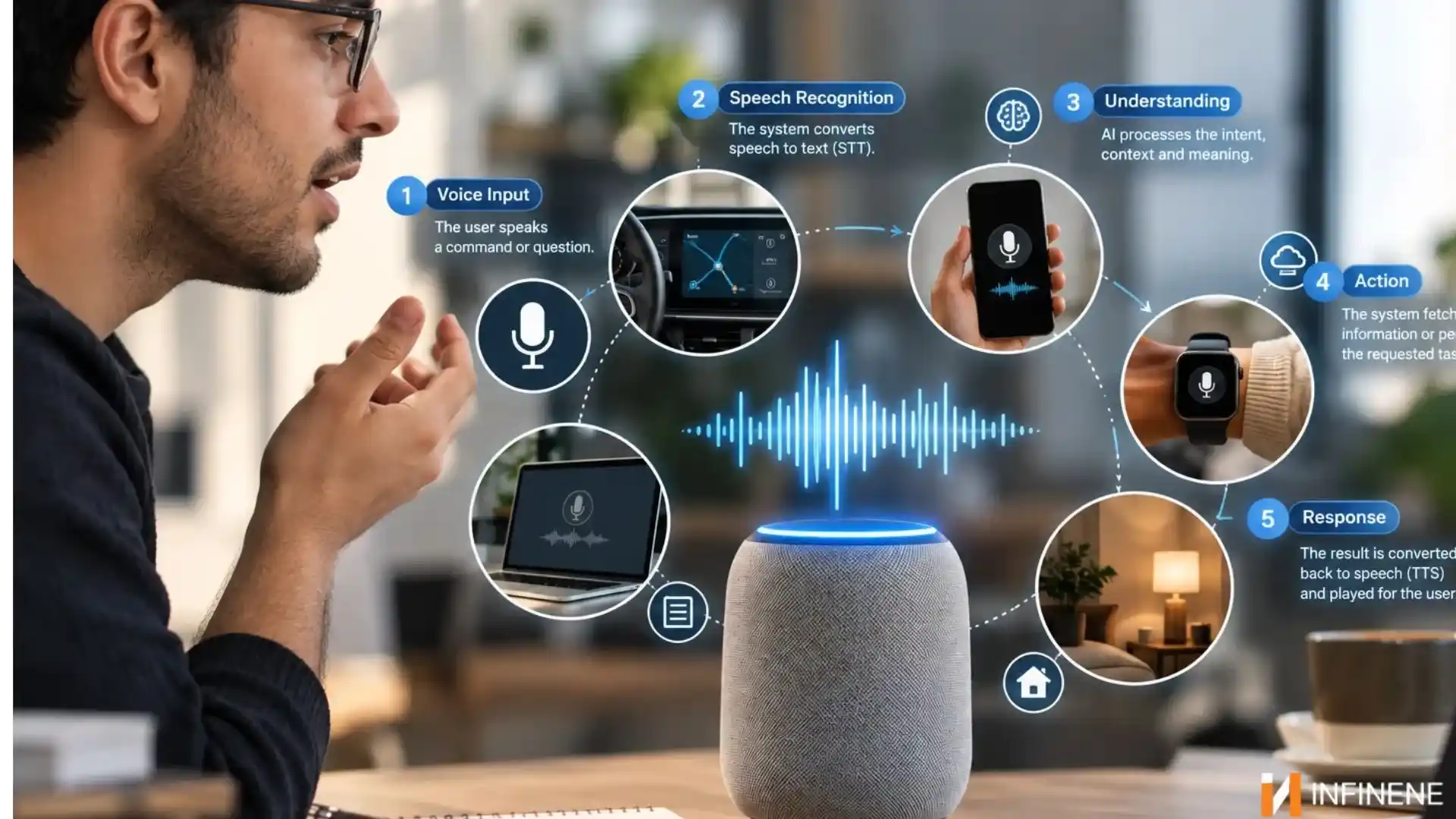
Say “play my morning playlist.” In about one second, four things happen at once. You do not have to be an engineer to get what is going on. It also helps to know where the weak points are.
First, the system turns your voice into text. That's automatic speech recognition, ASR for short, and it's the least reliable step. People mumble. They talk while the tap is running. They start a sentence. Then change their mind and finish a different one. Accents make it harder still, and so does a bad microphone. The same sentence might come through perfectly on a headset and turn into soup on a cheap speakerphone. Whatever goes wrong here follows the request all the way down the line. If "cancel my order" becomes "counsel my border," nothing after that can rescue it.
Now there's text, and something has to decide what it means. Natural language processing figures out what you mean and grabs the key parts around it, like the day, a person’s name, or an account number. So “Move my appointment to Thursday” and “Any chance I could come in Thursday instead?” should match the same intent.
In real life, that usually does not happen. Most people do not talk the way the designers imagined. If this step gives more space for everyday mistakes, it stops feeling like you are arguing with a vending machine.
Next the system speaks its answer, which is what text to speech does. Synthetic voices are much better than they were even a few years ago. And plenty of them sound natural now. A nice voice won't save a badly written reply, though. Pay attention to how it reads out a phone number or a confirmation code. Fifteen digits in one breath is useless. Broken into small groups with tiny pauses, it's something a person can actually write down.
This is the step most teams skip. A voice input UI system isn't finished on launch day. It should confirm what it heard, ask a short question when something's unclear, and get better from real use. The best information you'll ever collect sits in the transcripts, the failed requests, and the calls where someone just hung up. Read every week and the system improves. Ignore them and it slowly goes stale.
You don't need fancy technology for any of this. Mostly it comes down to respecting how people already talk.
Nobody wants to memorize commands. If a user has to remember an exact phrase, the design has already failed them. Let people say things their own way, let them cut in halfway through, and handle little follow ups like "and tomorrow?" without making them start from scratch. There's a cheap test for this. Read your script out loud to a coworker. If it sounds odd coming from a human mouth, it'll sound odd coming from a speaker.
Your system will misunderstand people, no question. What matters is the next ten seconds. Saying "sorry, I didn't catch that" three times in a row is the quickest way to lose a caller. Reword it on the second try. Give a short example of what they could say. After two misses, offer a way out, like a human agent or a text with a link. Fallback design is mostly about not making people feel stupid when the technology slips.
We read fast and listen slowly. Ten options look fine on a screen because your eyes can jump around, but by ear about three is the limit before people lose track. Put the useful part first and drop the filler. Nobody needs the same long greeting for the hundredth time, and every extra second of talking is a second someone spends waiting.
When the system uses the word "appointment" in one sentence but "booking" in the next, people begin to question if they mean different things. The same issue shows up with memory. Someone already gave you their zip code? Don't ask again two questions later. Small repeats like that make a system feel like nobody's home.
Do not wait until the end after the whole thing is finished. Voice tools can be useful for some users. For instance, they can help people with low vision. They can also help people who find it hard to use their hands. And they can support people who have trouble reading.
Still, these tools can leave others behind. If someone stutters or has a heavy accent, the system may not work well. A noisy setting can also cause trouble. A crowded train is a common example. Let users take their time. Support different kinds of speech. And make sure there is another way to complete the task that does not require speaking.
You will hear voice features in more areas than most people think. In each spot, you get different options to pick from.
A lot of people start with phones or wearables. The task is often short. You set a timer, write a message, or pull up directions. After that, many users rely on smart speakers and smart TVs. You can talk from across the room, and the device answers.
Many speakers do not have a screen, so you only get information through sound. Because of that, the device has to respond quickly and confirm what it heard in a clear way. TVs sit somewhere in between. You talk to search or control things, and the screen shows what it found.
In car assistants play by stricter rules because a driver's attention is a safety matter. They have to be fast, brief, and predictable. Long menus and drawn-out confirmations are out of the question.
Then there are phone systems and apps. Banks, airlines, and support teams use voice so customers can get things done without waiting on an agent. That's where voice starts to overlap with customer service, and we'll get to it shortly.
Underneath, a voice assistant interface is the same idea in different clothes. What changes from device to device is how much you can safely put in someone's ear, how loud the room is, and whether there's a screen around to help.
Voice isn't the answer to everything, and pretending it is causing bad projects. Here's an honest look at both sides.
Speed is the obvious one. Most people talk faster than they type. So, dictating a message or reading out an address is usually quicker than tapping it in.
Hands free use matters more than it sounds. If you're driving, cooking, or carrying boxes around a warehouse, voice lets you keep going without putting everything down.
Accessibility is a big one as well. People who struggle with keyboards or tiny screens get a real way in, provided the design was done with care.
Then there's the edge over competitors. Customers remember when a company let them fix a problem in thirty seconds instead of ten minutes. They also remember the opposite.
Privacy comes first. People hear about devices that listen for a wake word and they get uneasy. That reaction makes sense. Still, firms should be clear about what is recorded. They should also say how long the audio stays on file. They should explain how a user can remove it. Once trust is broken, it is hard to get it back.
Cost is the next surprise. A decent voice UI system takes real money. Good recognition, language training, testing, and constant tuning all add up, and teams who budget it as a onetime project tend to end up disappointed.
Task scope is limited, too. Voice is great for simple, clear jobs and weak at anything involving comparison. Asking someone to choose between eight mobile plans by ear is a terrible idea. A screen does that far better.
And ambiguity never goes away. Words that sound alike, vague requests, and background noise create constant confusion. A person clears it up without thinking by asking "this one or that one?" A voice system only does that if somebody built it too.
Voice tools have really helped in customer support. A lot of us have been stuck on hold, listened to several menus, and still reached the wrong team. That is where chat style AI can step in and smooth things out.
Take IVR, the interactive voice response system behind most phone menus. The old system says, “press 1 for billing, press 2 for sales,” and then it keeps going like that. The newer system asks what you need and lets you explain it in your own words. It is a small switch. But it cuts down a lot of frustration. The callers no longer have to figure out which choice fits their issue.
Call routing improves along with it. When the system understands what someone actually wants, it can send them to the right team on the first try. Fewer transfers mean shorter calls and calmer customers. Agents like it too, because they no longer open every call with "sorry, who told you to call us?"
Virtual assistants handle the usual tasks. That includes checking where an order is, helping with a password reset, or rescheduling an appointment. They may also collect a few key facts before a human joins in. Then the support rep does not start from zero and has some useful background right away.
The business case is fairly simple. Customers get answers faster because they skip the menus. Service runs 24/7 without paying for a full night shift. And the cost per contact drops, since routine calls stop tying up your people. That last part helps quality as well. When automation takes repetitive calls, your best agents can spend their energy on the conversations that need patience and judgment.
The setups that work treat voice automation and human agents as one system instead of two competing ones. A caller who needs a person should reach one quickly, and that person should already know what the caller was trying to do. If you're planning something like this, take a look at our Contact Center services to see how voice, people, and process can fit together.
Once the basics are covered, a few habits separate a voice experience people put up with from one they actually like.
Virtual assistants handle the usual tasks. That includes checking where an order is, helping with a password reset, or rescheduling an appointment. They may also collect a few key facts before a human joins in. Then the support rep does not start from zero and has some useful background right away. A system that opens with "I see your order shipped yesterday" feels much more helpful than one that starts with "what's your order number?"
Test with real speech. Designers tend to write dialogue in tidy, complete sentences. Real customers say things like "yeah, uh, I need to change, um, my address I guess." Collect recordings early, messy parts included, and train and test on those. If you only test with your own team, you're testing with people who already know how it works. And the results will flatter you.
Localize properly. Translation is only the beginning. A single language can sound very different depending on where someone is from. Even daily phrases can change from one place to the next. If your customers use different accents, or if they change languages mid-sentence, you should try it out with them in person. A system that only works for one accent quietly shuts out part of your audience.
Focus on what truly matters. It is easy to cheer a strong recognition rate and then walk away. But that number does not show if the caller got to the end of their request or gave up. Watch how often tasks actually finish. Also note the time it takes to reach a result. Count how many callers ask to speak with a person. Then review what callers say about how it went after the call. Then sit down and watch real people use it. You'll spot problems in ten minutes that no dashboard would ever show you.
Products you already know are a good way to see all this in practice.
Alexa works because it sticks to a small set of things people do over and over: timers, music, weather, home controls. People learn fast what it's good for, and that builds a habit. The catch is discoverability. With nothing to look at, plenty of owners never find out what else it can do. An invisible interface needs some way to show people what's possible.
Siri works where people already are. It runs on the phone. So, it can access messages, calls, reminders, and settings. This also shows how easily trust can break down. A few very public misunderstandings can shape how people feel about the whole assistant, even if it gets most requests right. Being reliably decent counts for more than being occasionally brilliant.
Android Auto is a lesson in designing around one hard limit, the driver's attention. Replies are short, confirmations are quick, and the screen asks for as little focus as possible. Any team building a voice for a place where safety or concentration matters can learn from that restraint.
Look at all three side by side and the pattern is clear. None of them tries to do everything. Each one fits a specific setting and handles a handful of jobs well.
Good voice user interface design is easy to describe and hard to pull off. Let people talk the way they normally talk. Plan for mistakes before they happen. Keep replies short and consistent, and think about accessibility from day one.
Try it with real voices. Check if people got what they asked for. Do not focus only on whether the tool “recognized” each word. If you do that, people will use voice because it helps them. They will not use it because you forced them to. Want to add conversational AI to support? Get in touch with the InfineneTech team. We can talk about a voice setup that reduces time on hold, helps with expenses, and makes customers feel heard.