


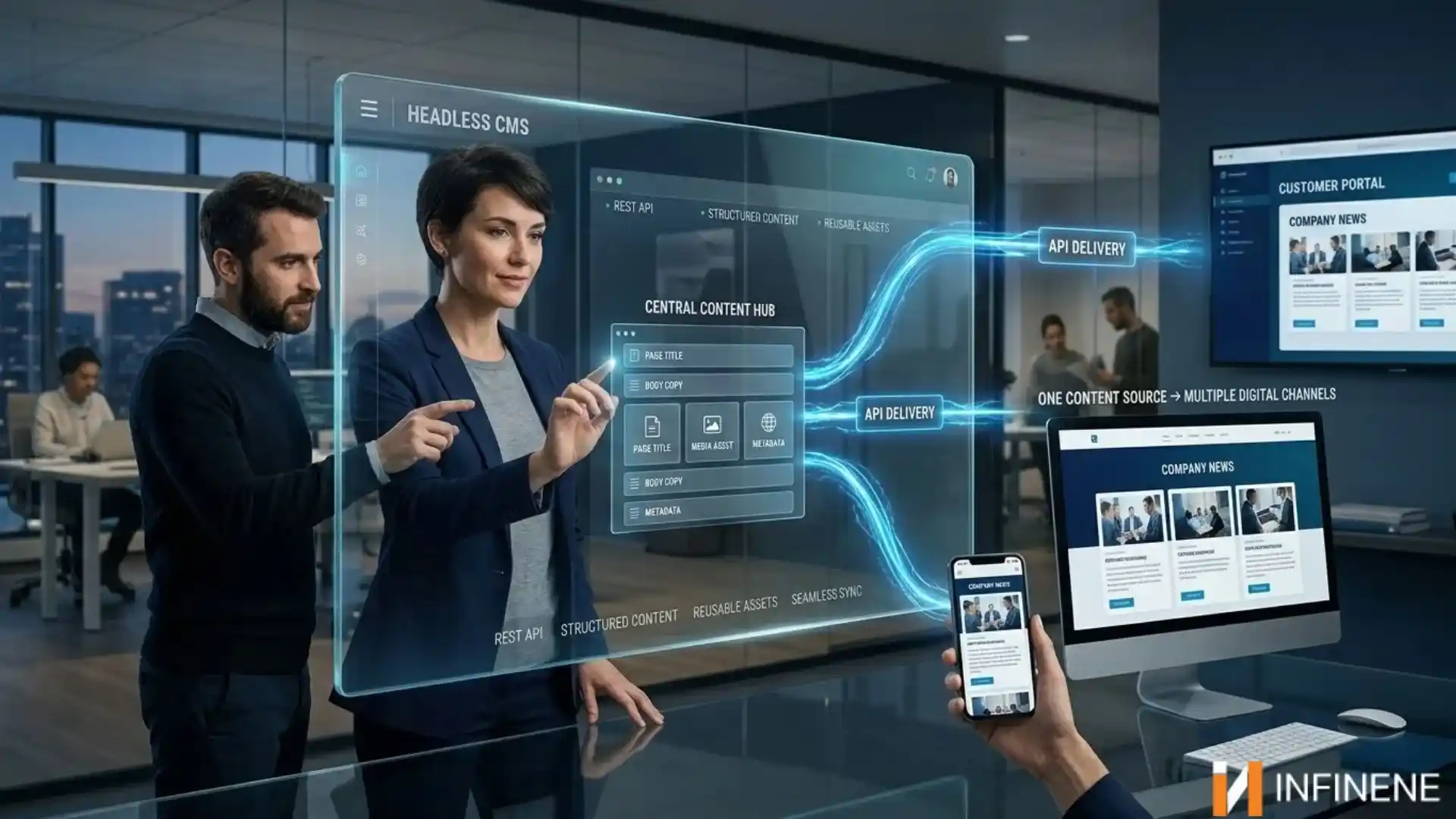
People do not just find your brand in one spot. They visit your site. They open an iOS or Android app. They sign in to a customer portal. They may even catch your message on screens in a store. When each channel is handled alone, teams end up redoing the same tasks. Updates take longer. The message can also drift.
A headless CMS helps with this. It keeps your content in one shared system. Then it sends that content out to each place you need, using APIs. This way, you are not locked into one website setup. In this guide, you will learn what is a headless CMS. You will also explore headless cms vs traditional cms, and how to handle content across apps with less hassle. You will also look at the main advantages and the real hurdles. Finally, we will cover what to look for in a headless CMS.
A headless CMS is used to run content work in the back end. It focuses on tasks like making content and arranging it as well as updating it over time. This kind of system does not include a built-in front end. So, it does not decide how the content will look to users. The idea is that the “head,” meaning the presentation part, is left out. That is why it is called headless. Here are the key concepts:
CMS backend: Editors handle writing, editing, review, and the setup of content. They also keep the content models in place, like items, product pages, author profiles, and landing pages. The front end is the part people actually use. That can be a website. It could be a phone app or even a kiosk. Developers make this layer using the tools that fit the project.
An API helps deliver the content from the server: Many teams choose REST or GraphQL for this part. The website application makes a request for some information. Once the application gets the response it can show the information however it wants. It’s not stuck to one way of displaying it. The app can pick any format that works best for the user. It could use text, lists or even pictures. The main thing is that the data is there. The app can choose how to show it. This gives the app a lot of freedom to be useful and easy to use.
Why the layers are separated: Publishing and design timing rarely match. Most editors want posts out quickly. Some developers take the time to get the layout right and test a new set of tools. If you divide the work one group can keep moving while the other group continues without ever stopping. The same base content can be used for user paths, not just one path. It helps save time and effort. You don’t have to build everything from scratch for each path. Just adjust what’s needed for each group. That way everyone stays on track.
When the content is data, a single entry can appear in completely different ways. On a website it may look one way. On a phone it can change again. On a digital screen it may look different again too. None of it has to be rewritten. The flow is straightforward.
An editor creates an entry. They fill in a title, a summary, a body and an image. There's no page layout involved at this stage. They're just entering information. The CMS saves that entry in a central repository. It has no design attached. It's plain, organized data. The API then allows entry. Apps can ask for access. The app makers decide who gets access and which parts of the data can be seen.
Each screen is shown in the app's own way. You might see some text on a website's front page. On a phone app the same text can appear as a line. The wording stays the same. The screen layout changes. If someone spots a typo, they fix the text once. After that any app that opens the entry will display the updated text immediately. I no longer need to search for a copy.
Companies often choose a headless CMS for simple reasons.
Teams should use one place to store content. By changing many copies, they update a single source, in one system.
That source can create outputs. A site, an app or a portal and other screen can all read from the same place.
Publishing feels less heavy. An editor makes one change, and the linked channels can use it quickly. There is no need to redo the work in each place.
This also helps people on the product side. Designers and engineers can shape the experience to fit the product. They are not limited by page templates.
As the product grows it becomes simpler to add features. If the team needs a channel, they can link it using the API. There's no need to start over.
Developers also enjoy freedom. They can use the tools and frameworks they already know and trust. Information like pricing and brand tone remain the same on every channel.
1. Put the work in one spot: Use the CMS as the place for content. Editors. Sign off there. They do not use tools for the website and the app.
2. Shape content for each channel: Do not build finished pages. Split the content into parts that can be reused so you can use them again later. For a product you might store a name and a short blurb. The product can be described easily. Include specs and images along with the price. You can show the set on a website. You can show less on a phone screen or on a display.
3. Link apps with APIs: Each app or channel should pull from the CMS using its API. The API asks for the pieces that the API needs. In my experience good API docs and clear content fields help developers move faster.
4. Send the data to different screens: Each frontend uses the same data. Then it renders that data, in its way. The website can use a layout. The mobile app can use a small card view. A digital display can show a title and an image.
5. Make an edit and use it everywhere: If something needs a change, editors update the entry just once. The time the connected channels load content they receive the new version. This cuts down on repeated edits. It keeps everything in sync. When a change is required later one edit updates all of the channels.
The key difference in headless cms vs traditional cms comes down to how they are built. In a traditional setup, like the classic WordPress style, the server side and the site display are tied together. With a headless CMS, those parts are split into separate pieces.
Feature |
Headless CMS |
Traditional CMS |
|
Architecture |
Backend only; frontend is separate |
Backend and frontend combined |
|
Content delivery |
Via APIs to any channel |
Mainly to the CMS's own website |
|
Frontend flexibility |
Any framework or technology |
Limited by themes and templates |
|
Omnichannel support |
Built for multiple channels |
Often requires workarounds or plugins |
|
Setup complexity |
Higher; needs development work |
Lower; works out of the box |
|
Editor preview |
May need extra configuration |
Usually built in (WYSIWYG) |
|
Scalability |
Frontend and backend scale independently |
Tied together, so scaling can be harder |
|
Best for |
Multi-channel, custom, or fast-growing products |
Simple sites, blogs, small businesses |
|
Technical skill needed |
Developer involvement is essential |
Non-developers can often manage it |
Your content can go to places. Wearables and other screens all use the publishing system. Adding a screen does not require a new setup.
Your front end can be adjusted as you work. Pick the tool for the task at each moment. If a tool breaks you replace it. Continue. The content stays put. Does not need to be moved.
You reuse content without redoing it. One product description can appear on a product page in an email or, inside an app. No one has to copy and paste text over and over.
You can scale without drama. Content and front-end components can grow at their own pace. A rush of visits on your website should not overwhelm the content system.
Updates get out faster. When you change something, it reaches each connected channel soon. Those changes matter for sales, support, and public notices. Timing is important when events occur.
Content and design are kept apart. Editors work on the message. Developers work on the user experience. Each side can work without getting stuck waiting on the other.
Modern tools connect more easily. With APIs you can add things, like search, shopping, analytics and personalization. You don’t have to wait for someone to make a plugin. You can do it yourself whenever you need. It’s easier that way. APIs let you connect tools and build what you want. This way you stay in control. You decide what to add and when. No delays. No waiting. Just. Go.
A headless CMS is powerful, but it is not free of trade-offs:
This is not all good news. A headless CMS has clear downsides too. You should learn what they are before you sign up.
Expect more building work. There is no theme switch and no template knob. The front end is on you, and you have to write it from the start. Without devs, or money to pay for them, this becomes a real block.
The API is the core link. If the system is slow or doesn't work every place that gets deliveries will notice. Reliable vendors are helpful. The problem is still, on you. Using caches and having plans is not something you can skip once you depend on the API.
Getting it running takes skill. You have to plan content fields, connect the API, and handle deployment. This cannot be finished in one afternoon using guesswork.
Editing can feel strange at first. With CMS editors usually get a good preview while they write. With a setup the system does not automatically know how the page will look.
So preview views often need extra steps. People who are used to instant live edits may be frustrated at the start.
Infrastructure matters here. I have found that depending on the service you choose you may need to decide where the front end runs. You may also need to manage how builds happen and how caching is set up. Some hosted options take care of parts of this. Not all of this.
It is not the choice for every project. If your website is a brochure, with a few pages or a simple blog going with a headless setup might end up adding more work than you really want. It's better to pick the setup that matches what you are trying to achieve.
There is no CMS that fits every team. The best choice depends on team makeup, where content will appear and available budget. Of chasing a single so‑called best headless CMS evaluates each option by the factors that truly matter to the CMS.
1. Begin with the API. See what it offers, like REST, GraphQL, or both. Look at how clear the docs are. Also check how it holds up when there is a lot of traffic. Since the API is the core of the system, any weak area here will hit you fast.
2. Next focus on content modeling. Content modeling should provide structures that can be reused and changed without patchwork. During a trial model content using a content type that is used today. Pay attention to how the process feels. Check if it stays flexible. Keep trying. Notice small changes. See if it still works well as you go. This helps you know if it fits your needs. Don’t rush. Take time to test it out. You’ll learn more by doing it step by step.
3. Then ask about scale. Will the system grow with your needs? You do not want to face a hard move later.
4. Think about the day-to-day developer experience. Solid docs help. Useful SDKs help too. An active community can solve problems quickly. Your developers will spend real time inside this tool.
5. Do not skip the editorial side. People who write and update content should actually like the interface. If editors avoid a platform, it will not pay off. Check the editing screens, the workflow steps, and what you get for preview.
6. Review integrations. The CMS should link up with the tools you already use. Such as your shop platform and analytics or marketing tools.
7. Also check security. Role based permissions are important. Audit logs matter. If you have to meet compliance needs make sure the platform supports that especially, in bigger organizations.
8. Test performance. Quick API replies and sensible caching affect how fast your sites and apps load.
9. Finally, look at pricing with care. Some products charge per user. Other providers charge by content size or by API usage. A plan that looks cheap at first can become expensive when you grow. I have seen this happen. If you think the plan is cheap watch the cost as your content size increases or as your API usage rises. The plan can turn costly as you scale.
10. Make sure you can publish in every place you want to reach. Check that your system handles one language without problems. Then test if your system can send messages through all the paths you plan to use. That means the channels you haven’t started using yet.
People in this field talk about a few platforms a lot.
Contentful comes up often. It is used in many big companies. It uses structured content, and it has a broad set of tools around it.
Sanity is also popular. It is very flexible. Developers can shape the editing setup to match what they need.
Strapi is an open-source choice. It lets a team manage hosting and make custom changes.
Storyblok blends a headless setup with a visual editor. Marketing groups tend to like that editor.
Directus is open source too. It works on top of your SQL database. It also adds an API plus an admin area.
Hygraph is built around GraphQL. It also aims to bring content together from different sources.
A headless CMS is a good match if:
You publish the same content to more than one place. For example, a web site and mobile apps, or other screens.
You plan to build your own frontend. Think modern tools and fast performance.
You have developers on hand. Or you can work with a team that will handle the frontend work and upkeep.
You expect to grow. New channels could arrive in the future. You might find that you need to update designs more frequently.
You focus on making sure that the way content is shown stays the same on every platform.
A headless CMS is a way to manage content. It stores content. Allows teams to update it easily. It does not come with a built-in website or page design. Instead, it delivers content using APIs. This means developers can use the content on a website or a mobile app or any other device.
An editor brings together the pages, inside the content management system. Once that is done a website or an application requests the content through an API. Then it displays the text and media using its design and formatting.
A traditional CMS keeps content storage and site display, in one platform. A headless CMS splits these parts. The content is sent out via APIs. That way the content can show up on types of sites and tools.
Not every case is the same. WordPress is quick to start. WordPress fits normal site needs. Some teams pick a CMS instead, especially when a headless CMS publishes to, then one channel or when a headless CMS wants a custom front end. That route usually takes work during development. WordPress can also be used in a setup.
Key gains include sharing content on different channels allowing the front end to be changed without much difficulty using the same assets again and again growing as needed when demand increases, releasing updates faster and connecting to today's tools without big problems.
What you need will decide the choice. First look at the API quality. Then examine how the content is modeled. Next, think about the workflow you want. After that review the integrations. How they connect. Then confirm the security setup. After that assess the speed and overall performance. Look at the pricing. The value you get. Make sure the solution supports more than one language. Then pick the option that fits your team and your goals.
Mobile apps can pull data from a CMS using the CMS API. This means mobile apps can change what users see in the app without publishing an app release.
When a business wants a site, a classic CMS is usually the easier option. A classic CMS can also be cheaper to set up. However, if a business plans to post on channels or wants a custom experience a headless approach can be a better fit.
A headless CMS keeps your content separate from the design. With a CMS you write the content once and then send it through APIs to a website to mobile apps to customer portals and to other devices. Many teams like a CMS because it keeps everything uniform and lets updates move faster. A headless CMS also makes it easier to adjust when channels change. The downside of a CMS is that it usually requires more engineering work and earlier planning. A standard CMS may be simpler for some teams and for builds.
Before you choose a CMS, list the channels you use now. Also note any channels you plan to add later. Then compare the CMS options with your team’s skills and your budget. If you expect to grow across channels a headless CMS can serve as a base for your content as your needs grow. If you expect to grow across channels a headless CMS can act as a base for your content as your needs expand.